Home WiFi can be troublesome! We want it to just work so we can Work From Home, stream video, and play Video games. We never think about the placement of the AP, and we hope it will just work where ever we place it. Unfortunately it does not work that way.
The first thing I think of when I design a Wireless Network is how do I get the best throughput and the least interference. This means we have to communicate on the 5Ghz spectrum, so we have more channels and can use 802.11 AC.
Ultimately WiFi is just RF (Radio Frequency), and we have to allow the signal to propagate through our home. Placing the Access Point (AP) in a cabinet face will not always allow for this. The best way to visual and determine what is going on in your WiFi Network is to conduct a Wireless Survey, this it what enterprises do when deploying and troubleshooting a wireless, so lets do one at home.
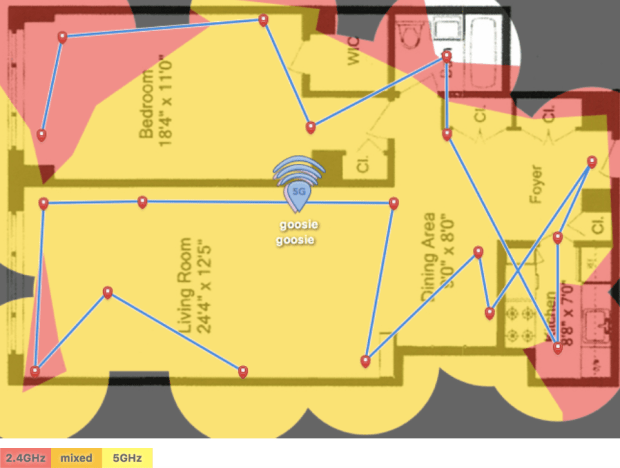
Below is a Survey of a 1 Bedroom, 825 Sqft apartment in NYC where the AP is hidden in a media cabinet, most likely where most of us place our AP’s.

What we see is in the center of the Living Room and Bedroom we are able to communicate on the 5Ghz and 2.4Ghz spectrum, but in the rest of the apartment we will only talk on 2.4 Ghz, minimizing our throughput and dramatically enhancing our likelihood of channel contention.
Now we move our AP to on top of the media cabinet, look at the difference!


 NYC Wifi and Home IoT